> ## Documentation Index
> Fetch the complete documentation index at: https://developer.uphold.com/llms.txt
> Use this file to discover all available pages before exploring further.
# Core API concepts and data model
> Learn the core concepts and data model behind the Uphold Enterprise API Suite — users, accounts, transactions, and assets — to design your integration.
This page introduces the core concepts and data model that underpin the API suite, providing a foundational understanding of how the financial infrastructure operates. Familiarity with these concepts will help you navigate the API documentation and design your integration effectively.
## Data model
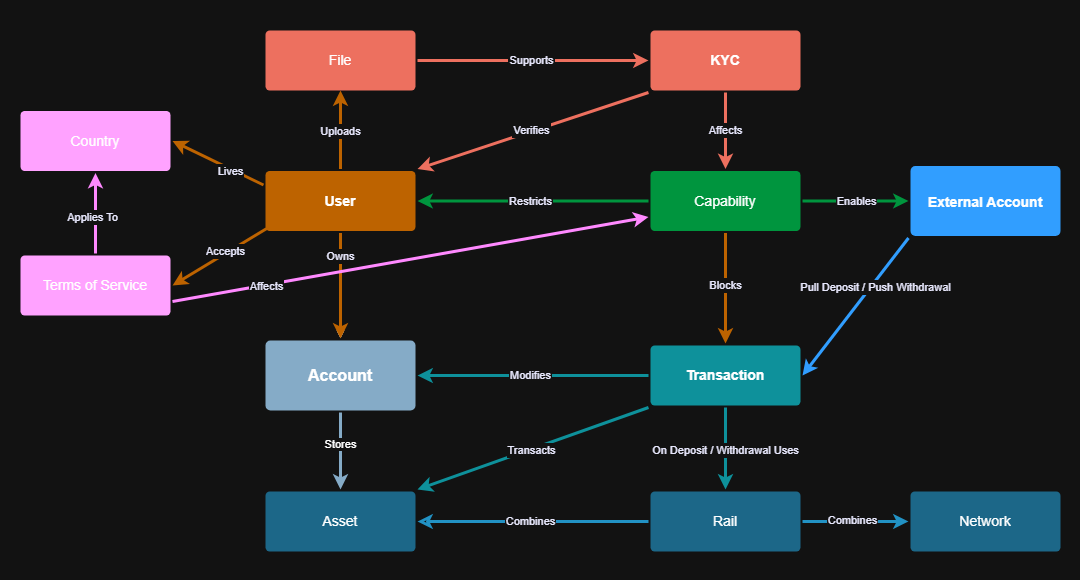 The diagram above outlines the key concepts and their relationships, providing a clear view of how the financial infrastructure operates.
When a **User** registers, they must specify their **Country of residence** and accept the applicable **Terms of Service**, which establish the legal framework for using the platform. To ensure compliance, every **User** must complete **Know Your Customer (KYC) processes**, a set of verification steps required before accessing financial services. The platform supports three types of KYC processes: **basic, form-based, and file-based**. For the file-based verification steps, the **User** must upload the required **Files** (e.g., government ID, proof-of-address) to provide the necessary documentation for verification.
A **User's KYC status** and the **Terms of Service** they accept directly influence their **Capabilities** on the platform. **Capabilities** define what important actions a **User** is allowed to perform. Depending on the **Capabilities** granted, the **User** may be restricted from performing certain operations, such as transacting or linking an **External Account**, e.g., a bank or a credit card.
Each **User** owns one or more **Accounts**, each storing balance of **Asset**. **Users** interact with their accounts primarily through **Transactions**, which modify **Account balances** by **trading, depositing, or withdrawing assets**. Deposits and withdrawals are powered by **Rails**, which determine how assets are transferred within a **Network**.
You can also create **External Accounts**, which enable users to link bank accounts or credit/debit cards. Unlike push deposits, **External Accounts** allow the platform to **pull funds** to an Account, with the **User**'s authorization. **External Accounts** can also be used as a withdrawal destination, enabling two-way transactions.
## Key concepts
### Denomination
Denomination currency refers to the currency unit in which the value of a transaction, trade, or financial asset is expressed.
It provides a consistent way to measure value across different assets or currencies. Additionally, knowing the denomination helps in assessing exposure to foreign exchange fluctuations.
The denomination currency is not necessarily the same as the currency used to pay. A user can buy an asset priced in EUR (denomination currency), but pay in USD.
As another example, users might:
* Hold balances in one currency (e.g., GBP)
* View prices in another (e.g., USD)
* Transact in yet another (e.g., BTC)
Specific examples:
1. **Buying Crypto**
* You buy 1 BTC priced at \$60,000 USD.
* USD is the denomination currency (price reference).
* You pay in EUR → conversion happens at settlement.
2. **Cross-Border Payment**
* A vendor invoice is denominated in GBP.
* You pay using USD.
* GBP remains the denomination currency (the expected value); USD is converted to match that amount.
3. **Portfolio Holdings**
* A portfolio lists all assets valued in a single denomination currency, like USD, giving a unified view even if balances are held in multiple currencies.
4. **Statements**
* A portfolio statement expresses all holdings in the requested denomination asset using period-end exchange rates.
* A transactions statement records the denomination asset and exchange rates at the time each transaction completed.
The diagram above outlines the key concepts and their relationships, providing a clear view of how the financial infrastructure operates.
When a **User** registers, they must specify their **Country of residence** and accept the applicable **Terms of Service**, which establish the legal framework for using the platform. To ensure compliance, every **User** must complete **Know Your Customer (KYC) processes**, a set of verification steps required before accessing financial services. The platform supports three types of KYC processes: **basic, form-based, and file-based**. For the file-based verification steps, the **User** must upload the required **Files** (e.g., government ID, proof-of-address) to provide the necessary documentation for verification.
A **User's KYC status** and the **Terms of Service** they accept directly influence their **Capabilities** on the platform. **Capabilities** define what important actions a **User** is allowed to perform. Depending on the **Capabilities** granted, the **User** may be restricted from performing certain operations, such as transacting or linking an **External Account**, e.g., a bank or a credit card.
Each **User** owns one or more **Accounts**, each storing balance of **Asset**. **Users** interact with their accounts primarily through **Transactions**, which modify **Account balances** by **trading, depositing, or withdrawing assets**. Deposits and withdrawals are powered by **Rails**, which determine how assets are transferred within a **Network**.
You can also create **External Accounts**, which enable users to link bank accounts or credit/debit cards. Unlike push deposits, **External Accounts** allow the platform to **pull funds** to an Account, with the **User**'s authorization. **External Accounts** can also be used as a withdrawal destination, enabling two-way transactions.
## Key concepts
### Denomination
Denomination currency refers to the currency unit in which the value of a transaction, trade, or financial asset is expressed.
It provides a consistent way to measure value across different assets or currencies. Additionally, knowing the denomination helps in assessing exposure to foreign exchange fluctuations.
The denomination currency is not necessarily the same as the currency used to pay. A user can buy an asset priced in EUR (denomination currency), but pay in USD.
As another example, users might:
* Hold balances in one currency (e.g., GBP)
* View prices in another (e.g., USD)
* Transact in yet another (e.g., BTC)
Specific examples:
1. **Buying Crypto**
* You buy 1 BTC priced at \$60,000 USD.
* USD is the denomination currency (price reference).
* You pay in EUR → conversion happens at settlement.
2. **Cross-Border Payment**
* A vendor invoice is denominated in GBP.
* You pay using USD.
* GBP remains the denomination currency (the expected value); USD is converted to match that amount.
3. **Portfolio Holdings**
* A portfolio lists all assets valued in a single denomination currency, like USD, giving a unified view even if balances are held in multiple currencies.
4. **Statements**
* A portfolio statement expresses all holdings in the requested denomination asset using period-end exchange rates.
* A transactions statement records the denomination asset and exchange rates at the time each transaction completed.