> ## Documentation Index
> Fetch the complete documentation index at: https://developer.uphold.com/llms.txt
> Use this file to discover all available pages before exploring further.
# Portfolio API introduction
> Retrieve aggregated user financial position data on Uphold: portfolio overview, performance metrics, and historical balances across all accounts and assets.
The portfolio group of endpoints provides aggregated insights into a user's financial position across all accounts. These endpoints allow you to track current holdings, performance metrics, and historical balances, offering a comprehensive view of investment performance and portfolio evolution over time.
## Core concepts
### Overview
The portfolio **overview** provides a snapshot of current holdings and total portfolio value. This represents the 'What you own right now?' view of a user's financial position, including:
* Total portfolio value across all assets
* Breakdown of each asset holding with available and total balances
### Performance
Portfolio **performance** focuses on investment analytics and profitability metrics. This answers the question 'How well are your investments doing?' by providing:
* **Average cost**: The average price paid of an asset
* **Total invested**: The total amount of funds invested in the portfolio
* **Unrealized gains/losses**: The difference between current value and total invested
Performance calculations consider both realized and unrealized gains, providing accurate investment analytics that reflect true portfolio value changes over time.
The endpoints offer multiple levels of granularity:
Aggregate performance across all user accounts, providing a unified view of investment success. Includes total returns, overall gain/loss percentages, and portfolio-wide investment metrics.
Individual account performance metrics, allowing you to analyze which specific accounts are performing best. Essential for understanding asset allocation effectiveness.
Bulk performance data retrieval for multiple accounts in a single API call. Optimized for dashboard applications that need to display performance across many accounts efficiently.
Individual asset performance metrics, allowing you to analyze which specific asset types are performing best. Essential for understanding asset allocation effectiveness.
Bulk performance data retrieval for multiple assets in a single API call. Optimized for dashboard applications that need to display performance across many assets efficiently.
### Historical balance
**Historical balance** tracking provides time-series data showing how portfolio values have evolved.
This enables trend analysis and 'How did we get here?' insights through:
* Data spanning the past hour, day, week, month, or year
* Total and available balance history
* Account-specific or asset-specific balance evolution
## Use cases
The portfolio endpoints power key features in financial applications.
Here are examples of how these endpoints are used in the Uphold Wallet to provide comprehensive portfolio insights:
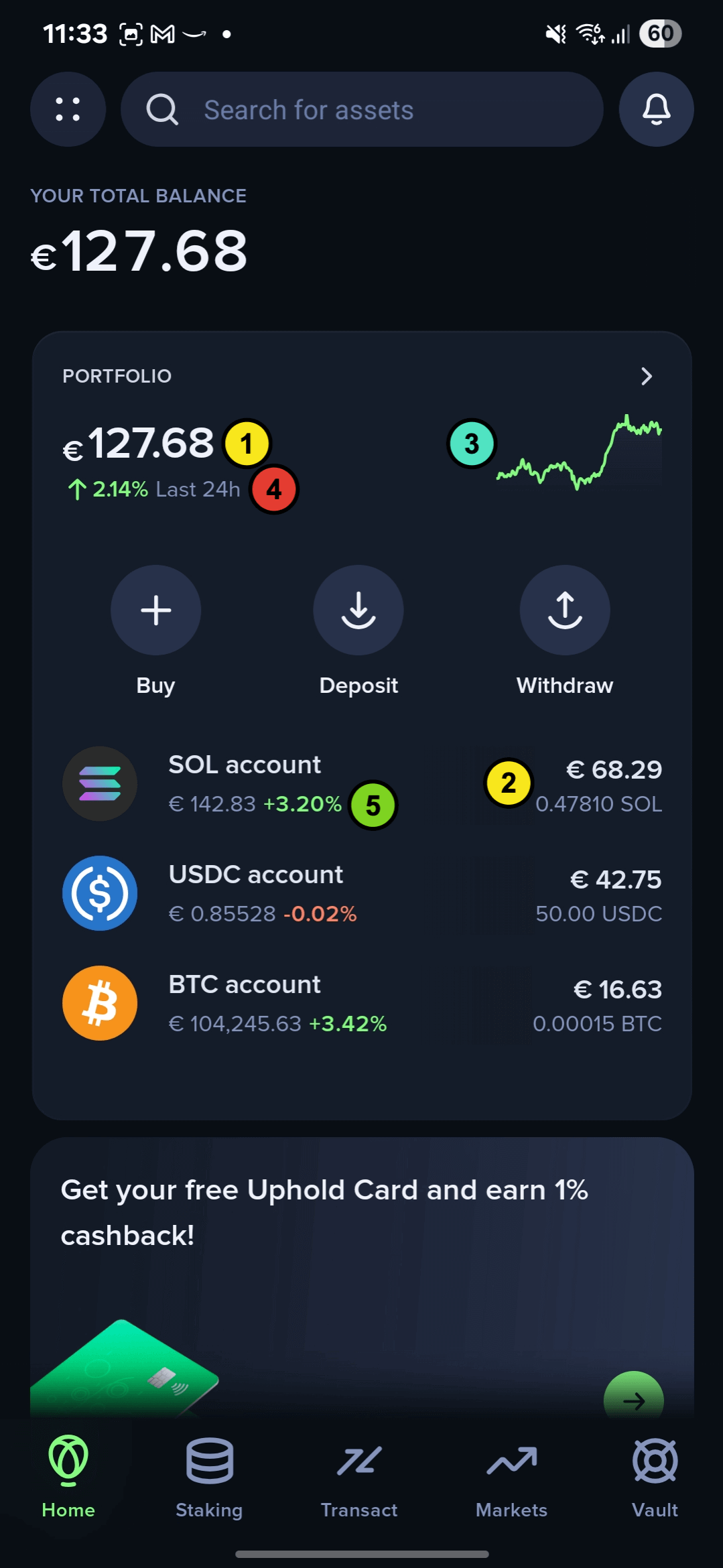
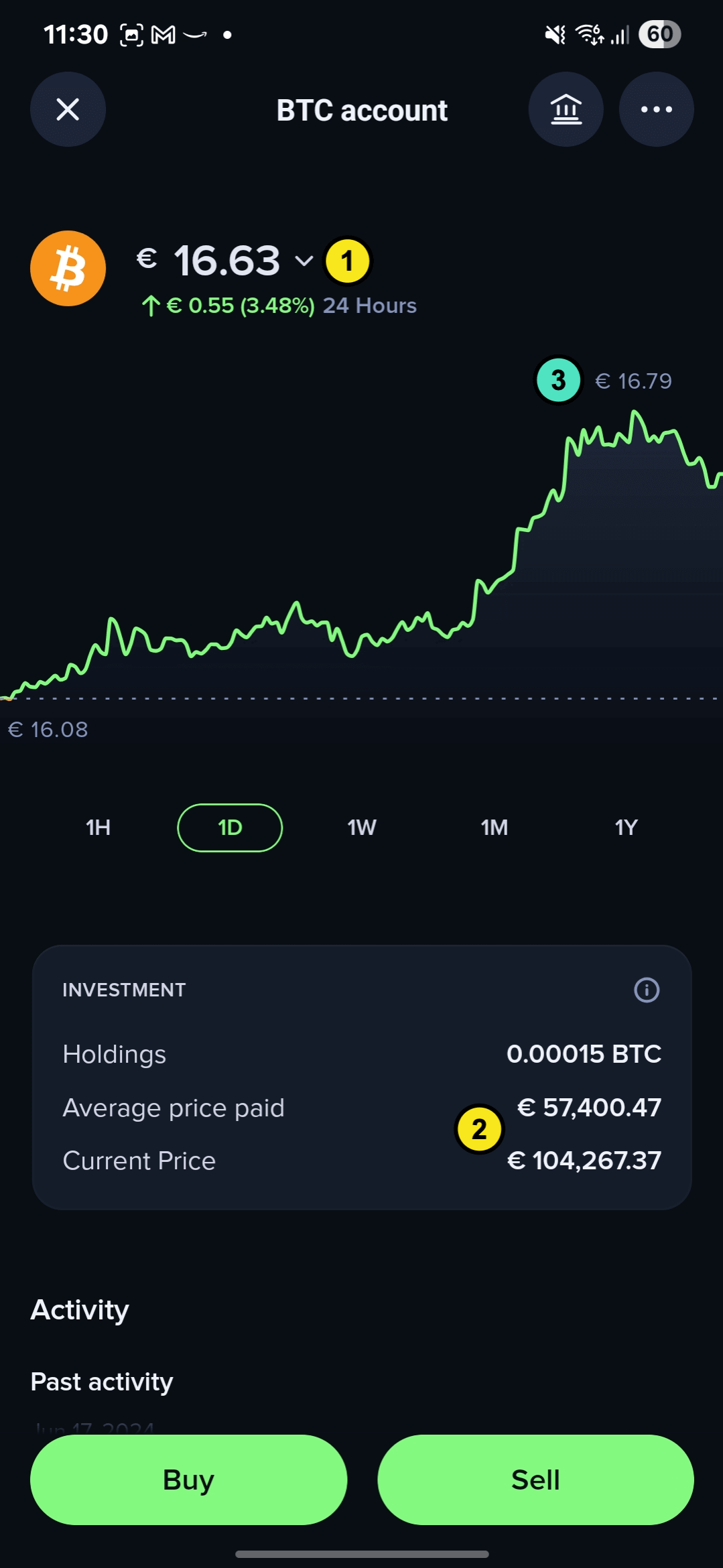 The two images above demonstrate real-world implementations of portfolio data. Here's how each endpoint contributes to building these comprehensive views:
#### Portfolio overview screen
| Annotation | Endpoint | Description |
| ---------- | ---------------------------------------------------------------------------------------------------------------------------------------------------- | ---------------------------------------------------------------------------------------------------------------------------- |
| 1 & 2 | [Get Portfolio Overview](./get-portfolio-overview) | Core Portfolio Data: The total portfolio balance and individual asset holdings |
| 3 | [Get Portfolio Historical Balance](./get-portfolio-historical-balance) | Historical Performance Visualization: The portfolio performance graph displays historical balance trends |
| 4 | [Get Portfolio Performance](./get-portfolio-performance) | Performance Metrics: The portfolio performance percentage is calculated |
| 5 | [Get Portfolio Account Performance](./get-portfolio-account-performance), [Get Many Accounts Performance](./get-portfolio-many-accounts-performance) | Account-Level Performance: Individual account performance indicators, powered by either single or multiple account endpoints |
#### Account detail screen
The individual account view focuses on specific account analytics:
| Annotation | Endpoint | Description |
| ---------- | -------------------------------------------------------------------------------------- | ------------------------------------------------------------- |
| 1 & 2 | [Get Portfolio Account Performance](./get-portfolio-account-performance) | Account Balance and Performance metrics |
| 3 | [Get Portfolio Account Historical Balance](./get-portfolio-account-historical-balance) | Account-specific performance chart showing historical balance |
The two images above demonstrate real-world implementations of portfolio data. Here's how each endpoint contributes to building these comprehensive views:
#### Portfolio overview screen
| Annotation | Endpoint | Description |
| ---------- | ---------------------------------------------------------------------------------------------------------------------------------------------------- | ---------------------------------------------------------------------------------------------------------------------------- |
| 1 & 2 | [Get Portfolio Overview](./get-portfolio-overview) | Core Portfolio Data: The total portfolio balance and individual asset holdings |
| 3 | [Get Portfolio Historical Balance](./get-portfolio-historical-balance) | Historical Performance Visualization: The portfolio performance graph displays historical balance trends |
| 4 | [Get Portfolio Performance](./get-portfolio-performance) | Performance Metrics: The portfolio performance percentage is calculated |
| 5 | [Get Portfolio Account Performance](./get-portfolio-account-performance), [Get Many Accounts Performance](./get-portfolio-many-accounts-performance) | Account-Level Performance: Individual account performance indicators, powered by either single or multiple account endpoints |
#### Account detail screen
The individual account view focuses on specific account analytics:
| Annotation | Endpoint | Description |
| ---------- | -------------------------------------------------------------------------------------- | ------------------------------------------------------------- |
| 1 & 2 | [Get Portfolio Account Performance](./get-portfolio-account-performance) | Account Balance and Performance metrics |
| 3 | [Get Portfolio Account Historical Balance](./get-portfolio-account-historical-balance) | Account-specific performance chart showing historical balance |