

Authorization always runs through the Payment Widget — for both new and already-authorized accounts. The widget collects Braintree device data and submits it with the transaction, which PayPal uses for fraud and risk analysis.
Prerequisites
- The user has completed onboarding.
- The
paypal-withdrawalscapability is enabled. - A funded account to debit the funds from.
- The Payment Widget is set up in your frontend. See Installation and setup.
Walkthrough
The diagram shows a first-time authorization. For an already-authorized account, skip the sign-in — the widget only collects device data and reuses the stored authorization.Check available rails
Call List rails to verify PayPal withdrawal is available.Check capabilities
Call List capabilities to confirm the user has thepaypal-withdrawals capability enabled with no unmet requirements.
Select source account
PayPal withdrawals can be sourced from any account. If the selected account is not in the PayPal account’s currency, the balance will be converted at the time of the transaction using Uphold’s prevailing rate. Make sure the origin asset has the necessary features enabled. Call List accounts to retrieve the user’s accounts and let them pick the one to withdraw from.Create a quote
Call Create quote with the user’s account as the origin and PayPal as the destination. There are two ways to specify the PayPal destination:-
apmshortcut — usetype: "apm"withmethod: "paypal". This is always accepted, whether or not the user already has a linked PayPal account. -
external-accountreference — if the user already has a linked PayPal account, you can reference it directly withtype: "external-account"and itsid(from List external accounts):
apm shortcut.
requirements array. If it contains authorize:paypal, the user must authorize PayPal before the transaction can be created.
Present the order summary
Before creating the transaction, display an order summary of the quote — the amount, fees, and the origin and destination — so the user can review it. Here’s an example: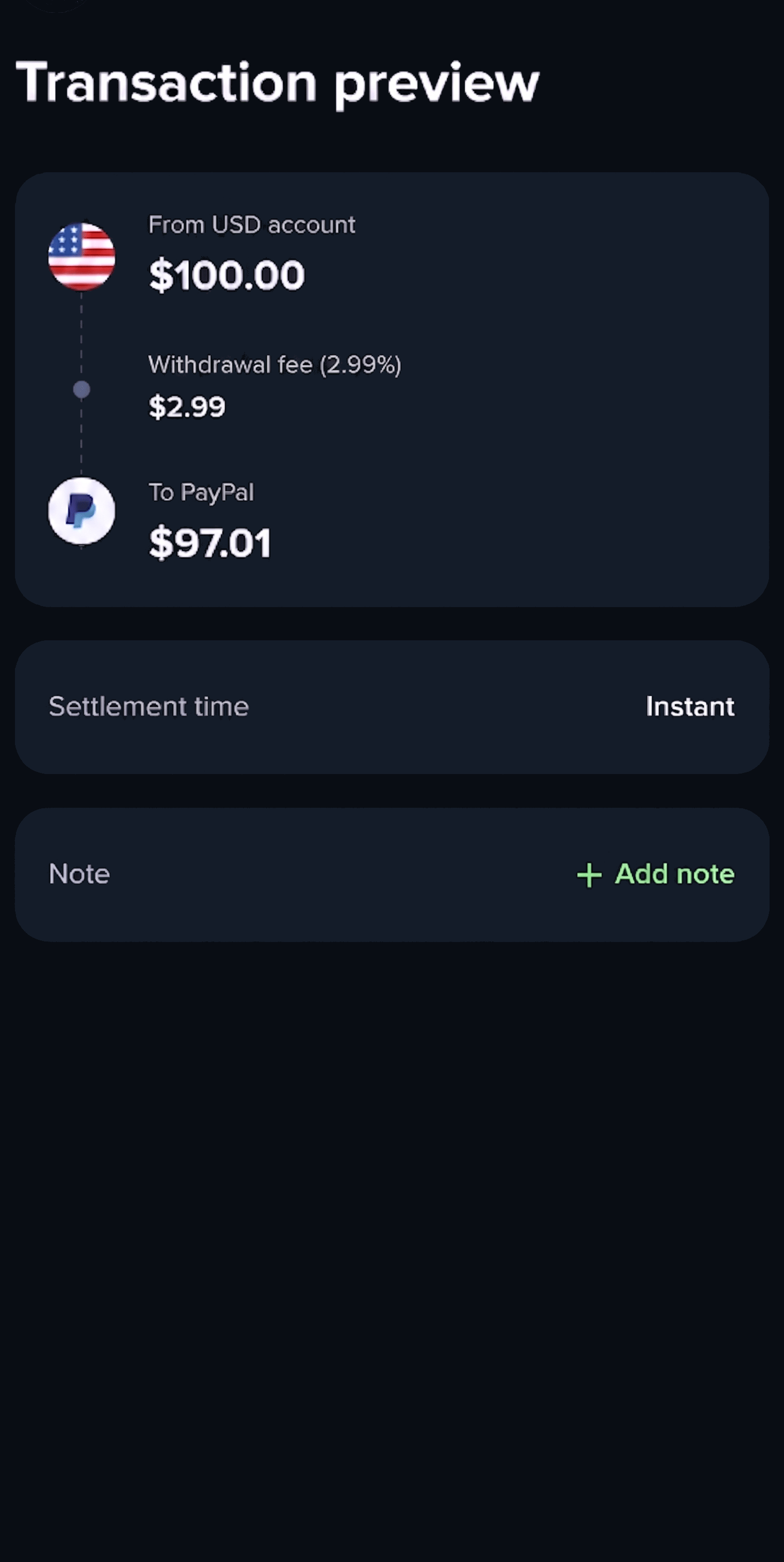
Authorize and create the transaction
After the user confirms the PayPal deposit quote, hand off to the Payment Widget Authorize flow. It creates the transaction, runs the PayPal authorization, and polls until a terminal status is reached — so the same flow works for both new and already-authorized accounts.Create an authorize session
Call Create widget session to start theauthorize flow, passing the quoteId and adding authorize:paypal to the requirements array. To customize the theme and layout, see the example here.
session object with a url field that loads the widget. Return response.session to your frontend as is.
Set up the widget
Initialize the widget with the session. The widget interacts with PayPal, creates the transaction, and polls until a terminal status is reached. For a new account the user signs in to PayPal to authorize; for an already-authorized account they do not sign in again — the widget only collects device data and reuses the stored authorization.Both examples above are for web applications — either creating the iframe yourself or letting the SDK do it. For native apps using a WebView, see Native apps with the Web SDK for the SDK’s native-bundling pattern, or Setup without the SDK for the no-SDK approach that loads the session
url directly as the WebView’s top-level page.Handle the complete event
transaction.statusDetails.reason:
Handle cancellations
Thecancel event fires when the user navigates back without completing authorization.
Handle errors
Theerror event fires for critical unrecoverable errors.
Most failures in this flow surface with a generic code: 'error' and a descriptive message. Transaction-creation failures are the exception: they use code: 'authorize_transaction_failed' with event.detail.error.details.reason: 'unable-to-create-transaction'. As with any Widget error, the original failure is preserved in event.detail.error.cause — for unable-to-create-transaction, event.detail.error.cause.code is one of:
Monitor for settlement
PayPal withdrawal transactions remain inprocessing while the payment settles. Monitor until the transaction reaches a terminal state.
- Webhook events (recommended):
- core.transaction.created —
status: processing→ transaction created, pending settlement - core.transaction.status-changed —
status: completed→ funds settled;status: failed→ irrecoverable error
- core.transaction.created —
- Polling (fallback): Get transaction
Sample transaction
In a successful PayPal withdrawal, the origin is the user’saccount and the destination is the external account representing the user’s PayPal account.
Notify the user
After the transaction completes, display the transaction details to the user so they can confirm the withdrawal succeeded. It must include the PayPal logo and the PayPal account email used. Here’s an example: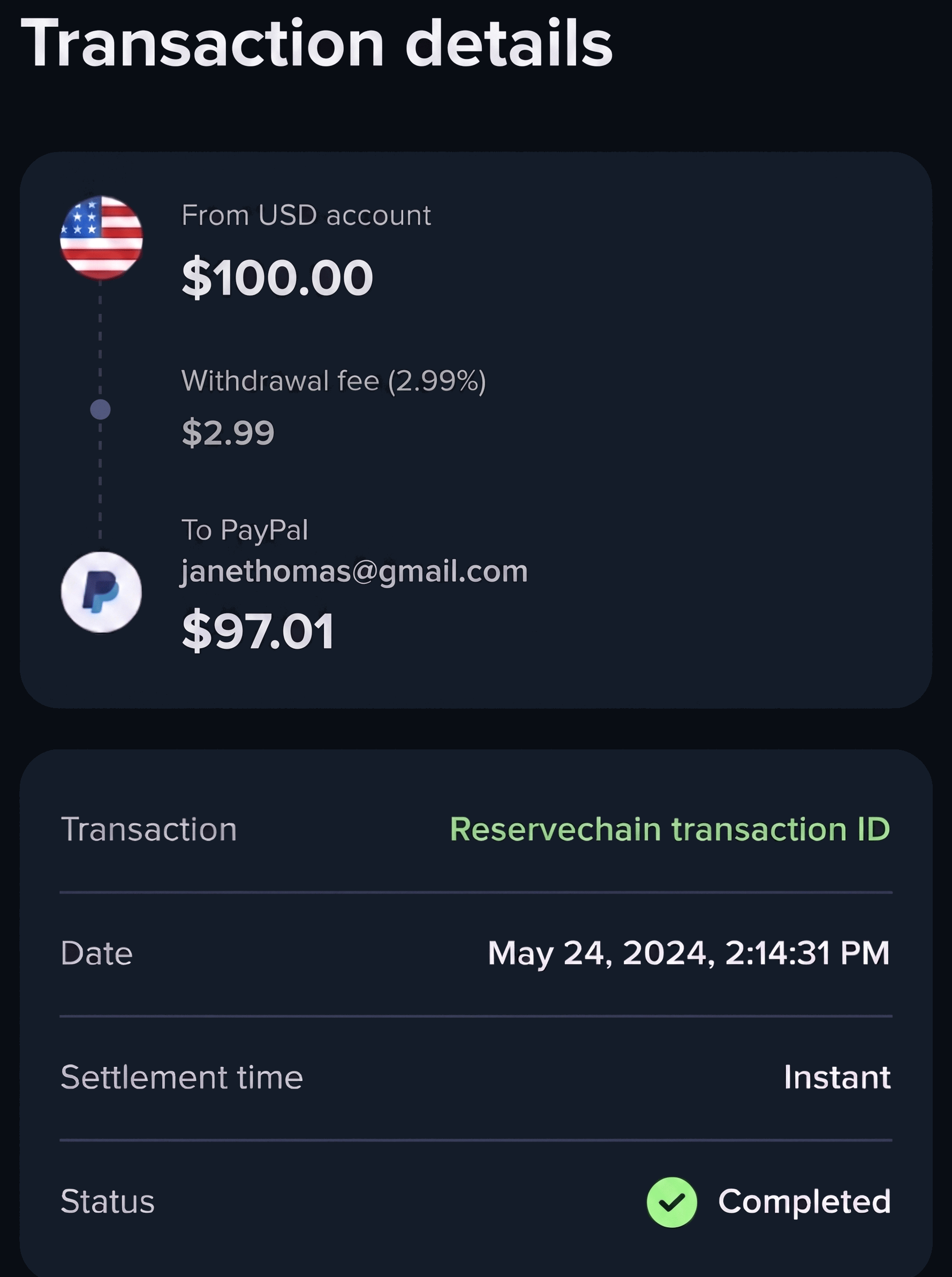
You now support PayPal withdrawals via the REST API together with the Payment Widget.